
11 KiB
ConvertX-CN
開箱即用的全功能檔案轉換服務 — 一個 Docker 命令,5 分鐘部署完成




)
為什麼選擇 ConvertX-CN?
| 特色 | 說明 |
|---|---|
| 📁 1000+ 格式 | 文件、圖片、影音、電子書一次搞定 |
| 🔧 20+ 引擎 | LibreOffice、FFmpeg、Pandoc 全到位 |
| 🈶 中文優化 | 內建中日韓字型與 OCR,告別亂碼 |
| 🌐 65 種語言 | 跨國團隊無障礙使用 |
| 📊 PDF 翻譯 | PDFMathTranslate + BabelDOC 雙引擎 |
| 📄 PDF 轉 MD | MinerU 智能擷取(保留表格、公式、圖片) |
📚 文件
完整文件請參閱 文件中心
| 分類 | 連結 |
|---|---|
| 🚀 快速入門 | 概覽 · 快速開始 · FAQ |
| 🐳 部署指南 | Docker · 反向代理 |
| ⚙️ 配置設定 | 環境變數 · 安全性 |
| 🔌 功能說明 | 轉換器 · OCR · 翻譯 |
| 🔗 API | API 總覽 · 端點說明 |
| 👩💻 開發 | 專案結構 · 貢獻指南 |
🚀 快速開始
Docker Run
mkdir -p ~/convertx-cn/data && cd ~/convertx-cn && \
docker run -d \
  --name convertx-cn \
  --restart unless-stopped \
  -p 3000:3000 \
  -v ./data:/app/data \
  -e TZ=Asia/Taipei \
  -e JWT_SECRET=Xk9mPqL2vN7wR4tY6uI8oA3sD5fG1hJ0 \
  convertx/convertx-cn:latest
⚠️ 安全提醒:正式環境請更換
JWT_SECRET為自己的隨機字串(至少 32 字元)
開啟瀏覽器:http://localhost:3000
Docker Compose(推薦)
💡 以下命令會自動建立
~/convertx-cn/data資料夾、產生docker-compose.yml並啟動服務
mkdir -p ~/convertx-cn/data && cd ~/convertx-cn && \
cat > docker-compose.yml << 'EOF'
services:
  convertx:
    image: convertx/convertx-cn:latest
    container_name: convertx-cn
    restart: unless-stopped
    ports:
      - "3000:3000"
    volumes:
      - ./data:/app/data
    environment:
      - TZ=Asia/Taipei
      - JWT_SECRET=Xk9mPqL2vN7wR4tY6uI8oA3sD5fG1hJ0
EOF
docker compose up -d
⚠️ 安全提醒:正式環境請更換
JWT_SECRET為自己的隨機字串(至少 32 字元)
開啟瀏覽器:http://localhost:3000
📖 詳細說明請參閱 快速開始
🔗 線上示範
🔗 https://convertx-cn.bioailab.qzz.io
| 項目 | 內容 |
|---|---|
| 帳號 | admin@example.com |
| 密碼 | admin |
⚠️ 示範站僅供測試,請勿上傳敏感檔案,會定期清理資料。
⚡ 常見問題速查
| 問題 | 解決方法 |
|---|---|
| 登入後被踢回登入頁 | 加上 HTTP_ALLOWED=true 或 TRUST_PROXY=true |
| 重啟後資料消失 | 確認 ./data:/app/data 且資料夾存在 |
| 重啟後被登出 | 設定固定的 JWT_SECRET |
更多問題 → FAQ
📦 支援格式
| 轉換器 | 用途 | 格式數 |
|---|---|---|
| FFmpeg | 影音 | 400+ |
| ImageMagick | 圖片 | 200+ |
| LibreOffice | 文件 | 60+ |
| Pandoc | 文件 | 100+ |
| Calibre | 電子書 | 40+ |
| Inkscape | 向量圖 | 20+ |
| PDFMathTranslate | PDF 翻譯 | 15+ |
| BabelDOC | PDF 翻譯/轉換 | 15+ |
| MinerU | PDF 轉 Markdown | 10+ |
完整列表 → 轉換器文件
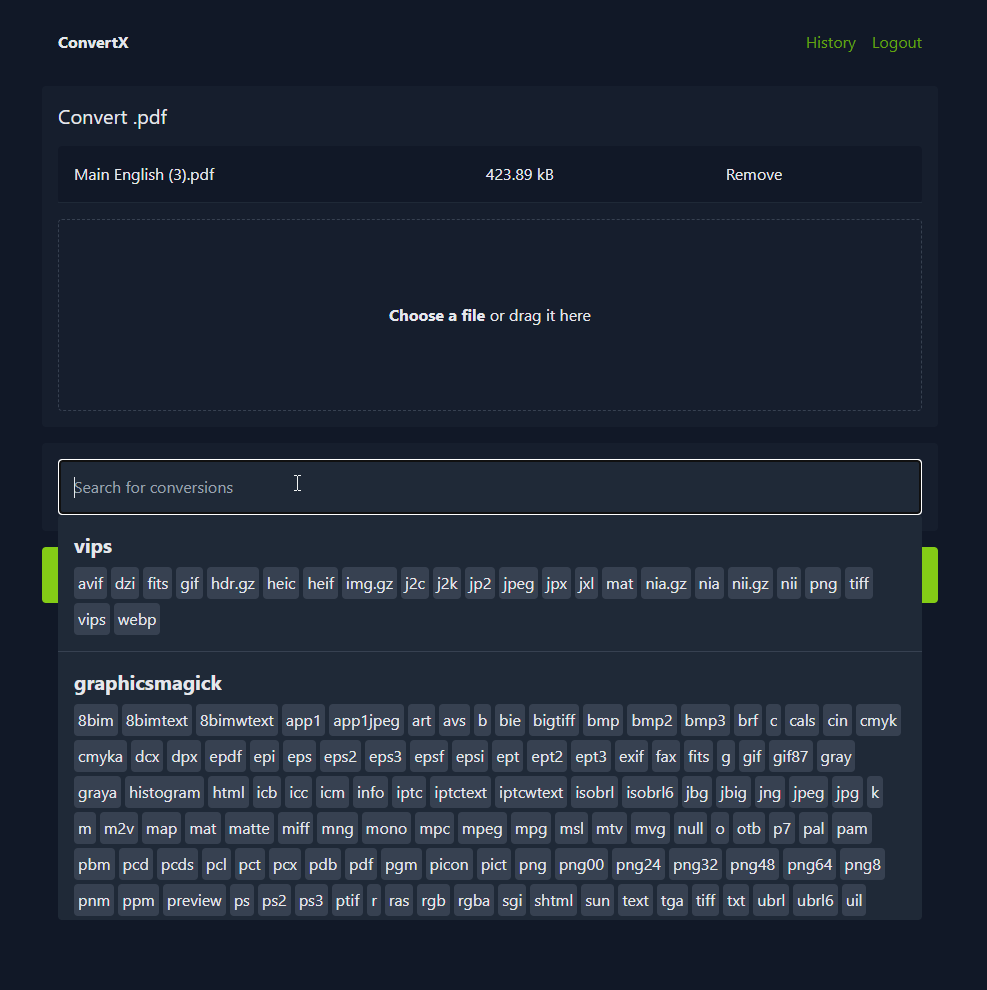
🖼️ 預覽
🔄 更新
docker compose down
docker compose pull
docker compose up -d
🎯 版本選擇:Lite / 一般版 / Full
ConvertX-CN 提供三個版本,滿足不同需求:
| 特性 | Lite 版 | 一般版(推薦) | Full 版 |
|---|---|---|---|
| Image 大小 | ) |
 |
約 12-15+ GB |
| 部署速度 | 最快 | 中等 | 較慢 |
| 適用對象 | 輕量使用者 | 一般使用者 | 進階/多語言 |
| 基本轉檔 | ✅ | ✅ | ✅ |
| OCR(7語言) | ❌ | ✅ | ✅ |
| PDF 翻譯 | ❌ | ✅ | ✅ |
| MinerU AI | ❌ | ✅ | ✅ |
| OCR(65語言) | ❌ | ❌ | ✅ |
| 完整 TexLive | ❌ | ❌ | ✅ |
版本標籤
| Tag | 說明 |
|---|---|
latest |
一般版最新穩定版 |
latest-lite |
Lite 版最新穩定版 |
0.1.15 |
一般版指定版本 |
0.1.15-lite |
Lite 版指定版本 |
Lite 版快速啟動
docker run -d \
  --name convertx-cn-lite \
  -p 3000:3000 \
  -v ./data:/app/data \
  -e JWT_SECRET=你的隨機字串至少32字元 \
  convertx/convertx-cn:latest-lite
📖 詳細說明請參閱 Lite 版部署指南
📄 License Overview
This is a Mixed License / Source-Available Project.
1. Upstream Components
Core components derived from C4illin/ConvertX are licensed under GNU AGPL v3.0.
- Any modifications to these files are open source under AGPL-3.0.
2. Author Original Components
Original modules, UI, i18n, and new features created by the ConvertX-CN author are licensed under Custom Non-Commercial License.
| 使用情境 | 是否允許 |
|---|---|
| 個人使用 | ✅ 允許 |
| 教育/研究 | ✅ 允許 |
| 商業使用 / SaaS | ❌ 需授權 |
📞 商業授權聯繫
如需商業授權,請透過以下方式聯繫:
- GitHub Issues: 建立 Issue (標題請加上
[Commercial License Request]) - GitHub Discussions: 社群討論
- GitHub Profile: @pi-docket
⚠️ Commercial Usage: If you plan to use this project in a commercial product, SaaS, or revenue-generating service, you must contact the author for a license exception regarding the custom components. The AGPL obligations (sharing source code) still apply to the upstream portions.
📄 完整授權說明 → LICENSE-OVERVIEW.md